Keap Ultimate
Tracking every lead, campaign, and sale across separate tools means your data is always a step behind. Connect Keap to Klipfolio Klips to put your marketing and sales metrics on one live dashboard, updated automatically.
Tracking every lead, campaign, and sale across separate tools means your data is always a step behind. Connecting Keap to Klipfolio Klips puts your marketing and sales metrics on one live dashboard, updated automatically.
How to connect Keap to Klipfolio
Before you build Klips or dashboards, you need your Keap account name and encrypted API key. Here's how to find both, then connect.
Find your Keap account name:
- Sign in to your Keap account.
- Click your name in the upper right corner.
- Record the combination of letters and digits shown next to Current app (for example, xy101). That's your account name.
Find your encrypted key:
- Click your name in the upper right corner.
- Go to Settings > API settings.
- If this is your first visit, enter an API passphrase of your choice to generate your encrypted key.
- Copy the encrypted key.
Connect in Klipfolio:
- Navigate to the Service Connectors page and select Keap Ultimate from the list.
- Choose a pre-built data source or click Create a custom Keap Ultimate data source.
- Enter your Account Name and Encrypted Key.
- Click Get data, confirm the data looks correct, then click Continue.
- Name your data source, set a refresh schedule, and click Save.
View the step-by-step setup guide
Top reasons to use Klipfolio for Keap dashboards
See your pipeline in real time. Pull contacts, leads, and deals into a live dashboard so your team always knows where revenue stands, without waiting for a manual export.
Track campaign performance alongside sales. Combine Keap marketing data with sales outcomes in a single view, so you can connect the dots between effort and result.
Share the right data with the right people. Use granular permissions, TV mode, public links, or scheduled PDF reports to distribute dashboards however your team works.
Start fast with pre-built Klips. Browse the Klip Gallery for ready-made Keap visualizations — or use them as a starting point for your own custom build.
Go deeper with the Keap API. Build custom data sources using Keap's XML-RPC API to pull exactly the data you need, from contact searches to order history.
What Klipfolio adds to your Keap workflow
| What you do in Keap | What Klipfolio adds |
|---|---|
| Export contact or sales data manually | Automated dashboards that refresh on your schedule |
| View metrics inside Keap's native reports | Combine Keap data with other tools in one view |
| Share screenshots or slide decks | Live dashboards distributed by link, email, or TV display |
| Build one report at a time | Reusable data sources that power multiple Klips |
Stop exporting data manually. Start tracking Keap performance in real time with Klipfolio.
Use pre-built Keap Ultimate metrics
Assemble a Keap Ultimate dashboard by selecting pre-built metrics from the Klip Gallery.
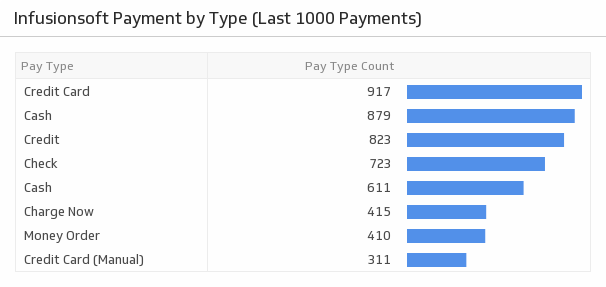
Payment by Type (Last 1000 Payments)
Monitor your top payment methods by type.
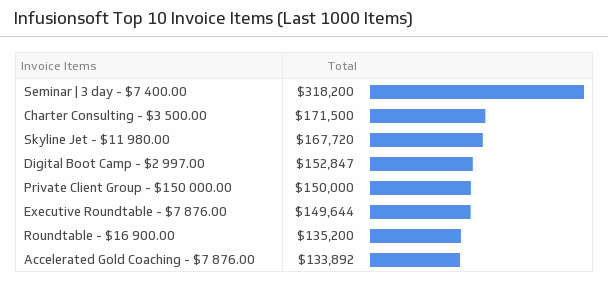
UsesTop 10 Invoice Items (Last 1000 Items)
Discover which invoice items are bringing in the most revenue.
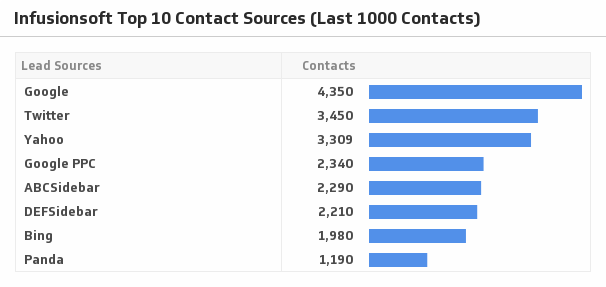
UsesTop Contact Sources (Last 1000 Contacts)
See where your traffic is coming from by visualizing your top ten contact sources.
Uses