X Ads
Connect your X Ads account to Klipfolio and build a real-time dashboard that tracks campaign performance, engagement, and spend — all in one place.
Tracking X Ads performance across campaigns shouldn't mean exporting CSVs or switching between tabs. Connect your X Ads account to Klipfolio and get a live dashboard that updates automatically.
How to connect X Ads to Klipfolio
Klipfolio connects to X Ads via OAuth. Once authorized, you can pull campaign data, account metrics, and more into custom Klips.
- In the left navigation sidebar, click the 3-dot menu beside Data Sources and select +New data source.
- On the Where is your data? page, select X Ads (Twitter Ads).
- Choose a pre-built data source or click Create a custom X Ads data source.
- Click Connect an account, enter your X login credentials, and click Allow Access to authorize Klipfolio.
- Select your X Ads Account and Campaign from the drop-down menus, then click Get data.
- Review the data preview, name your data source, set a refresh schedule, and click Save.
If you've connected before, select your existing token from the drop-down at step 4 and continue.
View the step-by-step setup guide
Top reasons to use Klipfolio for X Ads dashboards
See campaign performance in real time. Klipfolio refreshes your X Ads data as frequently as every minute, so you're never making decisions on stale numbers.
Centralize your paid social reporting. Combine X Ads data with other ad platforms, CRM data, or web analytics in a single dashboard — no manual consolidation required.
Customize without limits. Use Excel-like formulas and flexible layouts to build the exact view your team needs, from executive summaries to granular campaign breakdowns.
Share dashboards your way. Distribute reports via scheduled email, public links, TV mode, or embedded views — without giving everyone direct access to your ad account.
Start faster with pre-built Klips. Browse the Klip Gallery for ready-made X Ads Klips, or use them as a starting point for custom builds.
What Klipfolio adds to your X Ads workflow
| What you do in X Ads | What Klipfolio adds |
|---|---|
| Manually export campaign reports as CSV | Automated dashboards that refresh on a schedule you set |
| View metrics one account at a time | Cross-account and cross-platform views in one place |
| Share screenshots or static exports | Live dashboards distributed via link, email, or TV display |
| Build reports inside the X Ads UI | Fully custom layouts with your branding and metrics that matter |
Stop exporting reports manually. Connect your X Ads account and start building your dashboard today.
Use pre-built X Ads metrics
Assemble a X Ads dashboard by selecting pre-built metrics from the Klip Gallery.
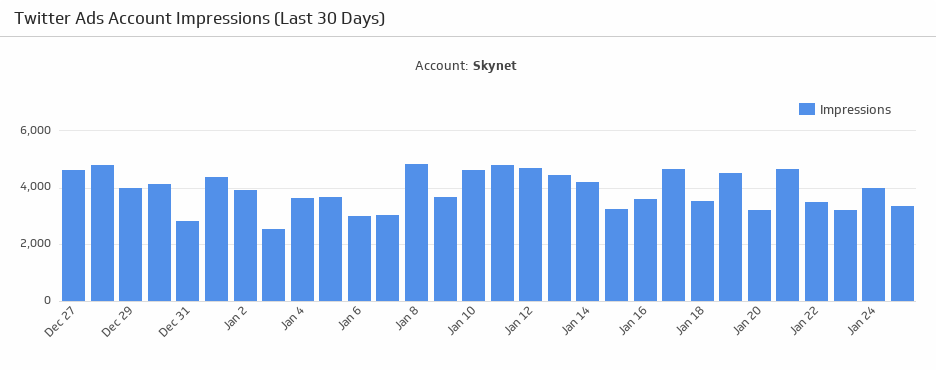
Account Impressions
Make sure your Twitter Ads account is making an impression! Monitor the number of impressions generated from your Twitter Ads account over the last 30 days.
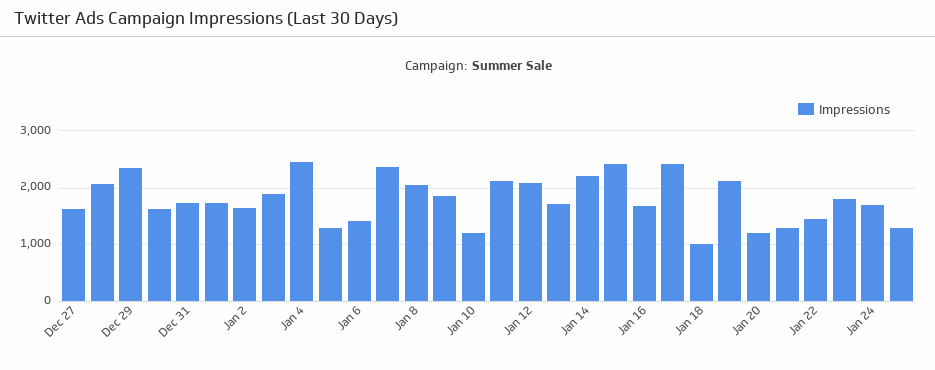
UsesCampaign Impressions
Make sure your campaigns are attracting attention! See the number of impressions generated from your Twitter Ads campaign over the last 30 days.
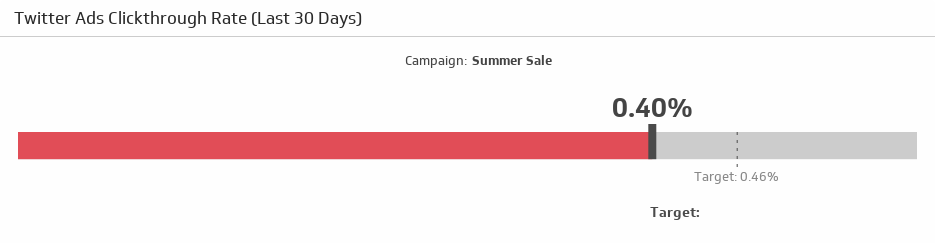
UsesClickthrough Rate
Compare your clickthrough rate over the last 30 days to your target.
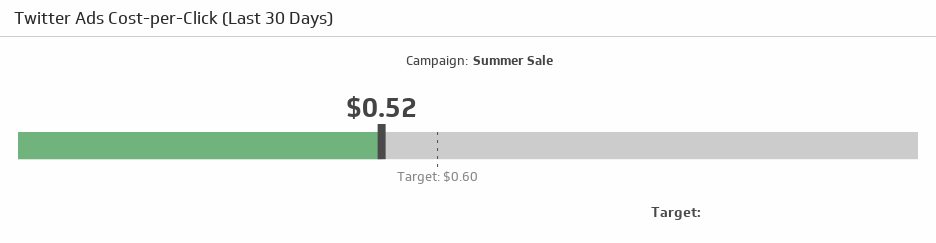
UsesX Ads Cost-per-Click
Compare your cost-per-click rate over the last 30 days to your target.
Uses