
Solutions
All your sales metrics and KPIs in one BI reporting tool
The control you want, the sales data you need.
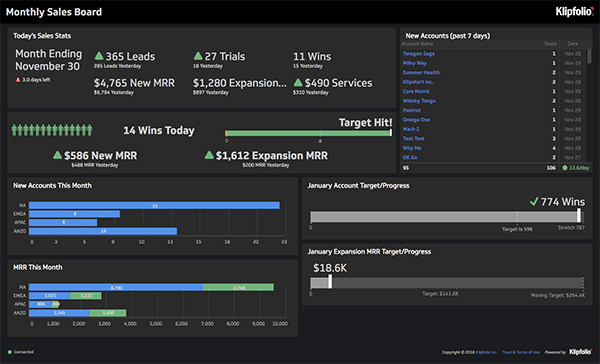
From our sales team to yours
We know how important it is to have control of your data, which is why we put together this quick video to show you what dashboards we use on a daily basis to help drive our own sales efforts. Watch the video and see what’s possible in Klipfolio.
Build a custom sales dashboard
Once you've assembled a few dashboards with our pre-built metrics, you're going to want to build custom dashboards from the ground up, with data flowing through the CRM or sales automation platform of your choice.
There’s a learning curve with any powerful software tool, but you’re in good hands and will soon be building out your own custom dashboards. We promise it'll be worth it.
Learn more about connecting your data with Klipfolio.
How to build your custom sales dashboard:
- Draw your dashboard on a napkin
- Decide which data sources you'll need to access in order to create your dashboard
- Use the custom editor to start bringing your data to life
- Adjust targets, indicators, data visualizations and dashboard layouts to suit your sales process, pipeline and culture
- Show current performance metrics against results for similar time periods in the past (Today vs. Yesterday, This Week vs. Last Week, etc.)
- Share dashboards among your sales team, or across the organization if you so choose, via wall-mounted TVs
Use a TV Dashboard display to share your dashboards
A TV Dashboard is a monitor setup to display key business metrics in real-time. TV Dashboards have evolved over the years from office whiteboards to office monitors that continuously display a business’ data.
There are a number of benefits to setting up a TV dashboard in your office such as transparency on all levels of the business, metrics-driven teams that can spot opportunity and fix discrepancies, as well as the ability for managers and executives to make real-time business decisions.
What’s the best way to display a TV Dashboard?
Dashboards can be displayed on TV horizontally or vertically. Vertical TV dashboard display is ideal for longer dashboards, typically ones that have more than 5 or 6 metrics. Due to the fact that TV dashboards are meant for quick, at-a-glance information, it’s best practice to limit your dashboard being horizontally displayed to a few of your most important metrics that you need to monitor multiple times a day in order to keep size large for optimal visibility
For more on TV dashboard options, check out our TV dashboard article.