Campaign Monitor
Connect Campaign Monitor to Klipfolio to track open rates, click-throughs, bounces, and subscriber data on a live, automated dashboard — no manual exports needed.
Tracking email campaign performance shouldn't mean exporting CSVs and stitching together reports by hand. Connect Campaign Monitor to Klipfolio and your key metrics update automatically on a live dashboard.
How to connect Campaign Monitor to Klipfolio
Klipfolio connects to Campaign Monitor using your API key. The setup takes a few minutes and gives you access to campaign summaries, subscriber data, and engagement metrics.
- Log in to your Campaign Monitor account and navigate to Account settings.
- Click API keys in the right navigation menu, then click Show API key and copy it.
- In Klipfolio, go to the Service Connectors page and select Campaign Monitor.
- Paste your API key, select your client name from the drop-down list, and click Get data.
View the step-by-step setup guide for full configuration details, including custom query options.
Top reasons to use Klipfolio for Campaign Monitor dashboards
See campaign performance at a glance. Open rates, click-throughs, bounces, and unsubscribes appear on one live dashboard — no manual exports required.
Start fast with pre-built Klips. Pre-built Campaign Monitor Klips cover the most common email metrics so you can have a working dashboard in minutes and customize from there.
Build exactly what you need. Use Excel-like formulas and the Klip Editor to combine Campaign Monitor data with other sources — CRM, web analytics, or revenue data — in a single view.
Share results your way. Distribute dashboards via TV mode, scheduled PDF emails, public links, or embeds so stakeholders always have current numbers.
Refresh on your schedule. Data refresh rates from 1 minute to 24 hours keep your dashboard as current as your campaigns.
What Klipfolio adds to your Campaign Monitor workflow
| What you do in Campaign Monitor | What Klipfolio adds |
|---|---|
| Manually export campaign reports as CSV | Automated dashboards that update in real time |
| View metrics one campaign at a time | Side-by-side comparison across campaigns and date ranges |
| Share screenshots or slide decks with stakeholders | Live, shareable dashboards accessible anywhere |
| Rely on Campaign Monitor's built-in charts | Custom visualizations combining email data with other business metrics |
Stop pulling reports manually. Start tracking every campaign on a live dashboard — connect Campaign Monitor to Klipfolio today.
Use pre-built Campaign Monitor metrics
Assemble a Campaign Monitor dashboard by selecting pre-built metrics from the Klip Gallery.
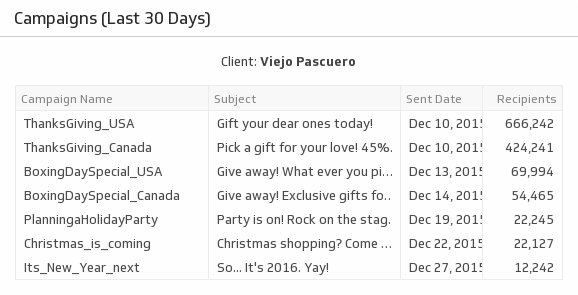
Campaigns (Last 30 Days)
Never lose track of your email campaigns with a list of all your mail-outs over the past 30 days.
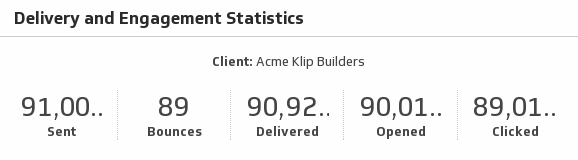
UsesDelivery and Engagement Statistics
Show the delivery and engagement statistics of your Campaign Monitor client.
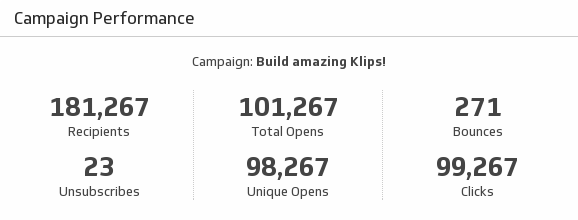
UsesCampaign Performance
Help your team make informed decisions by monitoring key metrics on your email marketing campaign performance.
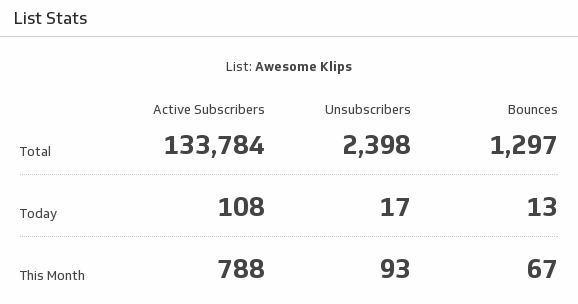
UsesList Stats
Use this indispensable Klip to monitor key stats on your email marketing list.
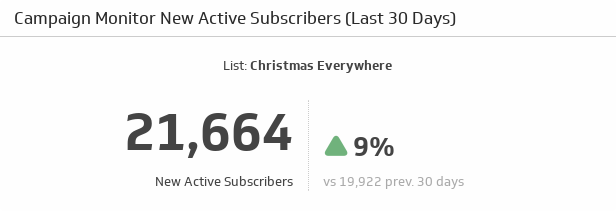
UsesNew Active Subscribers (Last 30 Days)
Watch the number of new and active subscribers grow over the past 30 days, and compare it to the previous 30 days.
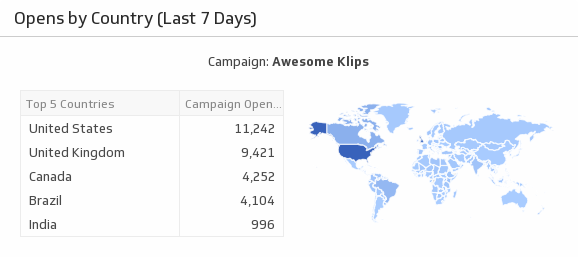
UsesOpens by Country (Last 7 Days)
Discover where your audience lies by monitoring campaign open rates by country.
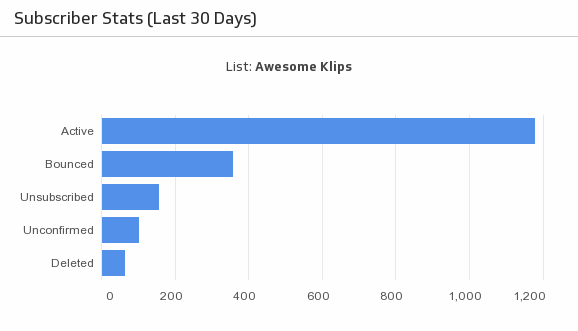
UsesSubscriber Stats (Last 30 Days)
Always know how many Active, Unsubscribed, Bounced, Unconfirmed and Deleted subscribers you have with an at-a-glance horizontal bar chart.
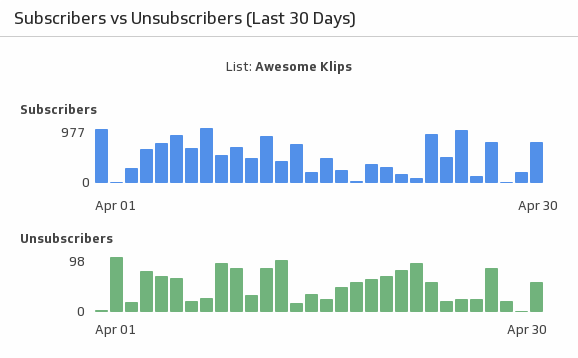
UsesSubscribers vs. Unsubscribers (Last 30 Days)
Compare your email marketing subscribers to unsubscribers over the past 30 days.
Uses