Freshdesk
Freshdesk is a cloud-based customer service platform built for helpdesk support. Connect it to Klipfolio to build live dashboards that track ticket volume, resolution times, and agent performance — and share them across your team or clients automatically.
Tracking your support team's performance shouldn't require manual exports. Connect Freshdesk to Klipfolio and get a live dashboard your whole team can act on.
How to connect Freshdesk to Klipfolio
Klipfolio connects to Freshdesk using your API key. You'll find it in your Freshdesk profile settings.
- Log in to your Freshdesk helpdesk and click your profile picture in the top right.
- Select Profile Settings and copy your API key from the sidebar.
- In Klipfolio, navigate to the Service Connectors page and select Freshdesk.
- Enter your Freshdesk domain and API key, then click Get data.
View the step-by-step setup guide
Top reasons to use Klipfolio for Freshdesk dashboards
Before you build, here's what you gain by connecting Freshdesk to Klipfolio.
Real-time visibility into support performance. Pull ticket volume, resolution times, and agent workload into a live dashboard that updates automatically — no manual exports needed.
Combine Freshdesk with your other tools. Merge support data with Salesforce, spreadsheets, or any of 130+ connectors to see the full picture in one place.
Build dashboards your clients actually want. Create branded Freshdesk dashboards for client accounts and share them instantly — by link, embedded view, scheduled PDF, or on a TV screen.
Custom visualizations without custom code. Use the Klip Editor and Excel-like formulas to build charts, gauges, and tables tailored to your team's metrics.
Keep your whole team aligned. Display your Freshdesk metrics on a shared screen or TV so every agent and manager is working from the same numbers.
What Klipfolio adds to your Freshdesk workflow
You already use Freshdesk to manage tickets and customer conversations. Klipfolio turns that activity data into a dashboard your whole organization can use.
| What you do in Freshdesk | What Klipfolio adds |
|---|---|
| Export ticket reports manually | Automated dashboards that refresh on your schedule |
| View metrics inside Freshdesk only | Share live dashboards by link, embed, email, or TV |
| Track support in isolation | Combine Freshdesk data with Salesforce, spreadsheets, and more |
| Build one-off reports per client | Clone and distribute dashboards across client accounts |
Stop rebuilding the same reports. Start sharing a dashboard that updates itself.
Use pre-built Freshdesk metrics
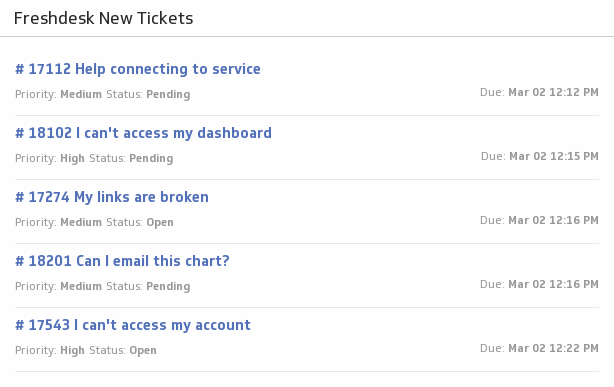
Assemble a Freshdesk dashboard by selecting pre-built metrics from the Klip Gallery.