Average Session Duration
Average Session Duration is the average time users spend on your website or app during a single visit, calculated by dividing total session time by the number of sessions in a given period.
Track all your Digital Marketing KPIs in one place
Sign up for free and start making decisions for your business with confidence.
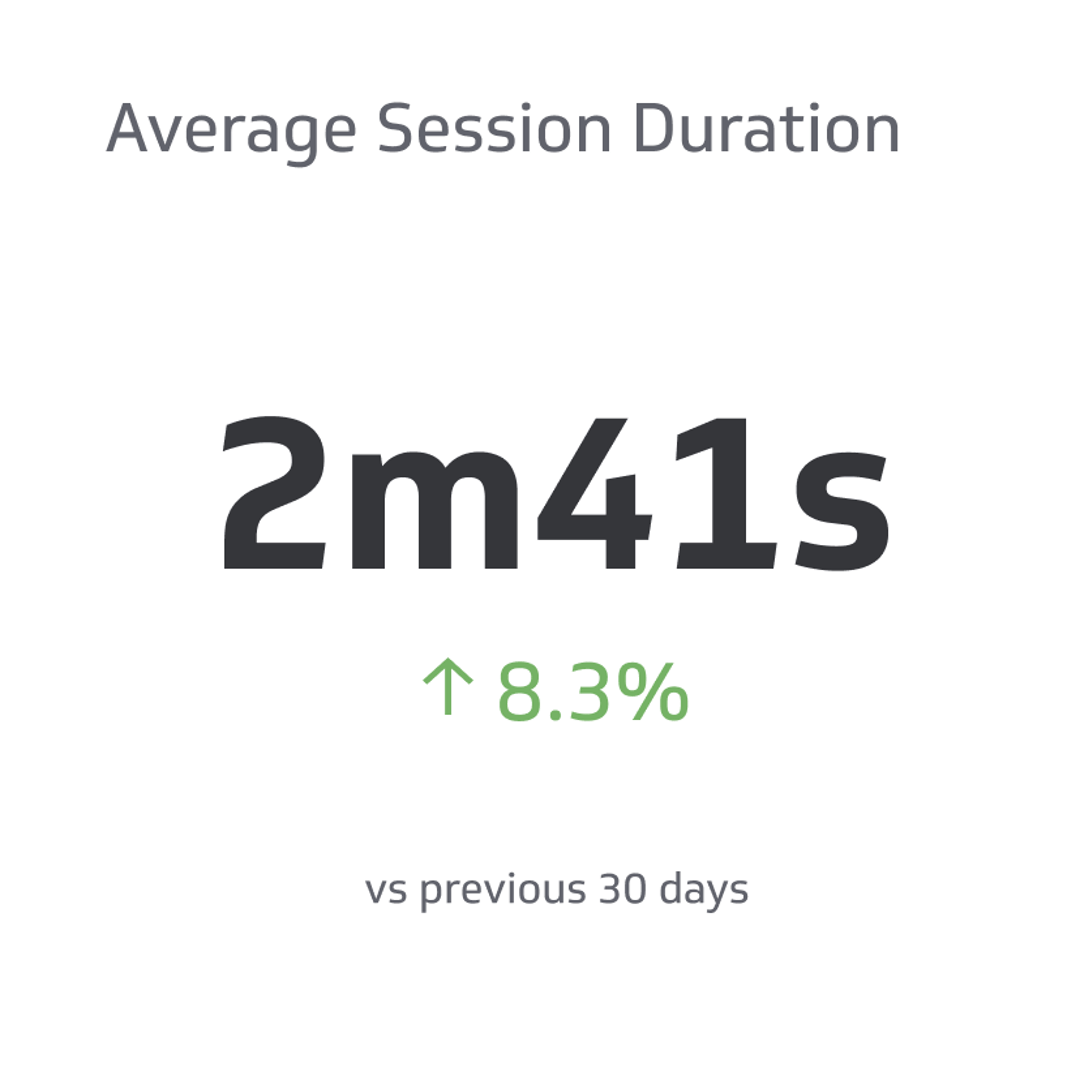
Average Session Duration is the average time users spend on your website or app during a single visit. It's calculated by dividing the total duration of all sessions by the number of sessions in a given period.
Tracking this metric tells you whether visitors are genuinely engaging with your content or leaving before they find what they need. A session that ends in seconds is a signal. So is one that stretches for several minutes.
That said, Average Session Duration means more when you read it alongside other metrics. A long session paired with a high bounce rate, for example, may mean users are stuck on one page rather than exploring your site.
What is Average Session Duration?
Average Session Duration is a standard key performance indicator (KPI) used in web analytics to measure how long users engage with a website or app during a single visit.
A longer duration generally signals that users are finding value, whether that's reading content, browsing products, or exploring features. But the number only tells part of the story. The type of site, the user's intent, and what happens after the session all shape what "good" looks like for your context.
What factors influence Average Session Duration?
Content type and user intent are the biggest drivers. A news reader may spend 90 seconds on an article and leave satisfied. A shopper comparing products may spend 10 minutes and still not convert.
Other factors that affect session duration:
- Content quality and relevance: Engaging, well-organized content keeps users reading and clicking through.
- Site usability: Confusing navigation or slow load times push users out early.
- Device and platform: Mobile users often have shorter sessions than desktop users.
- Traffic source: Visitors from organic search often have higher intent than those from display ads, which can affect how long they stay.
- Site purpose: E-commerce, SaaS, and content-heavy sites tend to have longer sessions than single-purpose landing pages.
Is a longer Average Session Duration always better?
Not always. A longer session is a positive sign when it reflects genuine engagement. It becomes misleading when users are lingering because they're confused or can't find what they need.
The most useful approach is to read Average Session Duration alongside other digital marketing metrics:
- Bounce rate: If sessions are long but bounce rate is high, users may be stuck on one page.
- Conversion rate: Long sessions that don't convert may indicate friction in the purchase or sign-up flow.
- User flow: Understanding the path users take through your site reveals whether long sessions reflect exploration or frustration.
What is bounce rate?
Bounce Rate is the percentage of sessions in which a user views only one page and leaves without any further interaction.
A high bounce rate isn't always a problem. On a blog, users often come to read one article and leave — that's expected behaviour. On an e-commerce site or a multi-page app, a high bounce rate more often points to a mismatch between what the visitor expected and what the page delivered.
To lower bounce rate, focus on:
- Relevance: Make sure page content matches the intent of visitors arriving from search or ads.
- Speed: Slow load times are one of the most common reasons users leave immediately.
- Navigation: Clear menus and internal links give users a reason to stay.
- Calls to action: Visible next steps reduce the chance a user exits without engaging further.
What is a good Average Session Duration benchmark?
A general benchmark of 2–3 minutes is often cited, but it varies considerably by industry and site type. E-commerce and content-rich sites typically see longer sessions; single-page tools or informational sites may see shorter ones.
The most meaningful benchmark is your own historical data. Track Average Session Duration over time and compare it against:
- Your site's past performance
- Industry averages for your category
- Specific pages or traffic segments you're trying to improve
A session duration that's dropping over time, or sits well below your industry peers, is worth investigating — even if the raw number looks acceptable.
How to improve Average Session Duration
Improving session duration comes down to giving users a reason to stay and an easy path to keep going.
- Create high-quality, relevant content that matches what your audience is looking for and answers their questions clearly.
- Improve site navigation so users can move between sections without friction or confusion.
- Add interactive elements such as videos, calculators, or quizzes that reward continued engagement.
- Use internal linking to surface related content and guide users deeper into your site.
- Personalize recommendations based on user behaviour to surface content or products they're more likely to engage with.
- Reduce technical friction by improving page load speed and fixing errors that interrupt the experience.
What is user experience?
User experience (UX) is the overall quality of a person's interaction with a product, website, or app — covering ease of use, clarity, visual design, and how well the experience helps users accomplish their goals.
Good UX reduces friction. Users find what they need faster, take action with less hesitation, and leave with a positive impression. That translates directly into longer sessions, lower bounce rates, and higher conversion rates.
Can Average Session Duration vary by industry or platform?
Significantly. A social media platform might see average sessions of 10+ minutes. A news site might average 90 seconds. A SaaS app might have sessions that vary widely depending on the user's role and task.
This is why cross-industry comparisons have limited value. The more useful question is: given what your site is designed to do, are users spending enough time to accomplish it?
How to track Average Session Duration
Web analytics platforms like Google Analytics 4 (GA4) report Average Session Duration automatically. You can filter by date range, traffic source, device type, or audience segment to get more specific reads on where sessions are longer or shorter.
For teams that want to monitor session duration alongside other KPIs in one place, connecting your analytics data to a dashboard makes it easier to spot trends and share results without digging through multiple reports each time.
How to find Average Session Duration in Google Analytics 4
- Go to analytics.google.com and sign in.
- Select the property for the site or app you want to analyze.
- In the left-hand menu, navigate to Reports > Engagement > Overview.
- Look for Average engagement time per session — this is GA4's equivalent of the classic Average Session Duration metric.
- Use the date range selector and comparison options to analyze trends over time.
Note: GA4 measures "engaged sessions" differently than Universal Analytics did. Engaged sessions require at least 10 seconds of active engagement, a conversion event, or two or more pageviews. This means GA4 figures are not directly comparable to historical UA data.
Average Session Duration vs. Average Time on Page
These two metrics measure engagement at different levels.
| Metric | What it measures | Scope |
|---|---|---|
| Average Session Duration | Time spent across an entire visit, from entry to exit | Session-level |
| Average Time on Page | Time spent on a specific page before navigating away | Page-level |
Average Session Duration gives you a view of overall engagement. Average Time on Page tells you which specific pages are holding attention — and which ones users are abandoning quickly. Both are useful; the right one depends on the question you're trying to answer.
How conversion rate and user flow connect to Average Session Duration
Conversion rate is the percentage of users who complete a desired action — a purchase, a form submission, a sign-up. User flow describes the path they took to get there (or where they dropped off before reaching it).
These metrics interact with Average Session Duration in important ways:
- A long session with a low conversion rate may mean users are engaged but encountering friction before they convert.
- A short session with a high conversion rate may mean users are finding exactly what they need quickly — a sign of good UX, not disengagement.
- Analyzing user flow alongside session duration helps identify where users exit and what changes might keep them moving toward conversion.
How to visualize Average Session Duration
Choosing the right chart depends on what question you're answering.
- Line chart: Best for tracking Average Session Duration over time and identifying trends, seasonal shifts, or the impact of site changes.
- Bar chart: Useful for comparing session duration across segments — by traffic source, device type, or audience group.
- Heatmap: Helps visualize which pages or sections of your site attract longer or shorter sessions, pointing to content that resonates or areas that need work.
Connecting your analytics platform to a dashboard lets you monitor Average Session Duration alongside related metrics like bounce rate and conversion rate, so you're always working from a complete picture rather than a single number.
Best practices for Average Session Duration
- Match content to intent. Users who land on a page and find exactly what they expected are more likely to stay and explore. Align your content with the queries and sources driving traffic to each page.
- Make navigation intuitive. Clear menus, visible search, and well-placed internal links reduce the effort required to keep exploring.
- Optimize for all devices. Mobile sessions are often shorter by default. Ensure your site performs well on smaller screens to avoid losing mobile visitors early.
- Use data to guide decisions. Review Average Session Duration regularly alongside bounce rate, pages per session, and conversion data. Look for patterns rather than reacting to single data points.
- Test changes and measure impact. When you update content, redesign a page, or add a new feature, track whether session duration shifts. That feedback loop is how you improve over time.
Wrapping up
Average Session Duration is a reliable indicator of engagement — but it's most useful when read in context. A number on its own doesn't tell you whether users are satisfied or confused, converting or churning.
Pair it with bounce rate, conversion rate, and user flow to understand what's actually happening during those sessions. Use that combination to make decisions you can stand behind, not just report on.