
Summary - Agile teams need visibility into work-in-progress, defect response, and delivery pace. Learn the six metrics that drive alignment and keep development on track.
Agile development teams thrive on visibility and rapid feedback. To keep your team aligned and delivering on commitments, you need metrics that matter—ones that surface bottlenecks, track progress, and guide daily decisions. This article explores the key metrics that help development teams stay focused on their core objectives: shipping features reliably, resolving defects quickly, balancing maintenance with innovation, and keeping long-term roadmap projects on track.
Why metrics matter for agile teams
Every software development organization shares the same fundamental goals. You want to continuously deliver value to production, respond quickly to customer issues, maintain code quality without sacrificing velocity, and ensure strategic initiatives stay on schedule. Without visibility into these areas, teams make decisions in the dark—pulling from different tools, relying on memory, or defaulting to whatever feels urgent.
The solution is to centralize your key metrics in one place: a dashboard that your team can reference daily, project on a big screen, and use in standups to drive action. When your entire team sees the same data at the same time, alignment happens naturally. When a metric goes red, everyone knows what to do.
The core metrics framework
The following six metrics form a complete picture of development health. Each one tracks a specific objective, connects to a real data source, and triggers a clear action when it moves outside acceptable limits.
Unresolved issues
What it measures
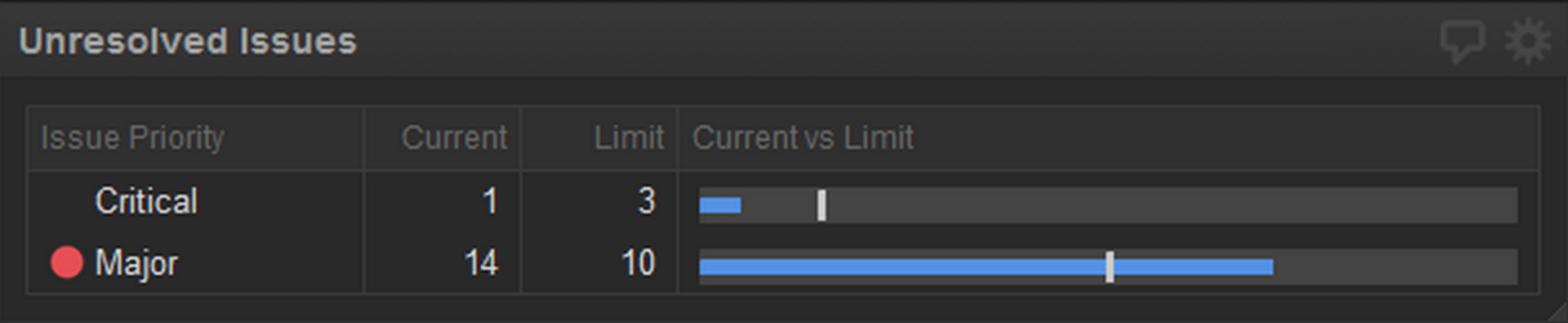
This metric tracks the count of critical and major issues in your backlog. Priority levels are typically assigned during a triage meeting where Support, Product Management, Development, and Quality Assurance representatives review incoming defects together. The goal is twofold: prevent a backlog of severe issues from accumulating, and maintain customer satisfaction through rapid response.
Why it matters
Critical and major issues directly impact customer experience. A growing pile of unresolved high-priority work signals that your team is falling behind on commitments or that incoming defect volume is outpacing your capacity to fix them.
When to act
If the count exceeds your defined threshold, revisit priorities immediately. Shift team focus to defects until the metric returns to green. This might mean pausing feature work temporarily to address customer-impacting bugs.
Data source
Issue tracking tools like Jira, YouTrack, or Azure DevOps.
Work in progress (WIP) limits
What it measures
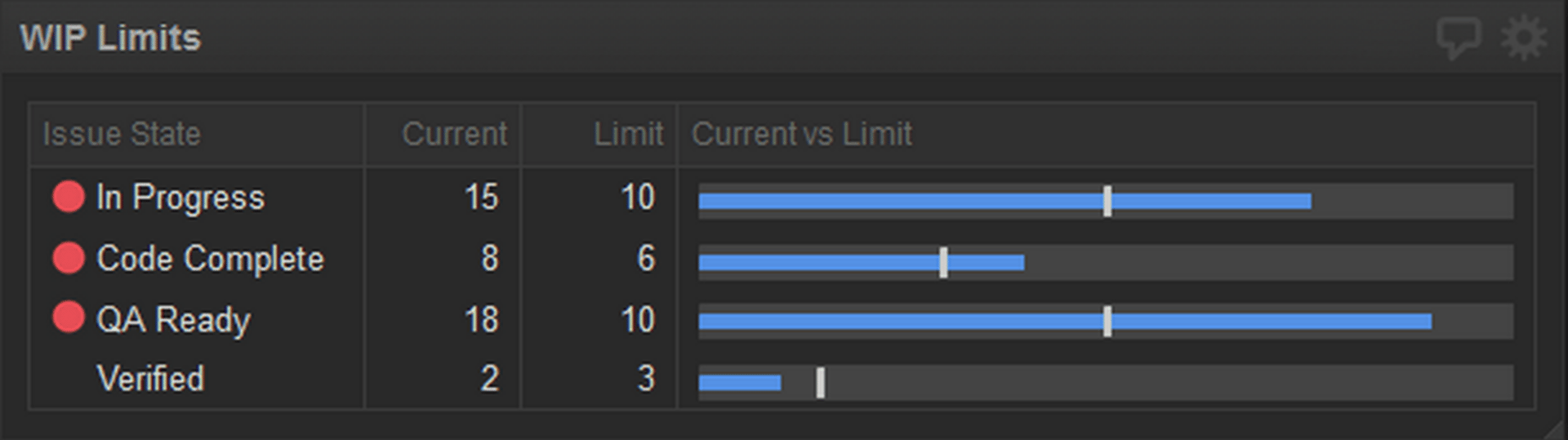
WIP limits cap the number of items allowed in each stage of your development pipeline—such as "In Development," "Ready for QA," "In Testing," and "Ready to Release." This is a core Kanban concept that helps teams identify and eliminate bottlenecks.
Why it matters
When too many items pile up in a single stage, work stalls. For example, if ten items are waiting for QA but only two testers are available, your pipeline backs up. WIP limits force the team to finish work before starting new work, which improves flow and reduces context-switching.
When to act
If any stage exceeds its WIP limit (typically shown as a red indicator on your dashboard), stop pulling new work into that stage. Instead, focus on moving existing items through. If QA is overloaded, developers help with testing. If "Ready to Release" is full, prioritize deployments over new features.
Data source
Issue tracking tools like Jira, YouTrack, or Azure DevOps.
Feature versus bug investment
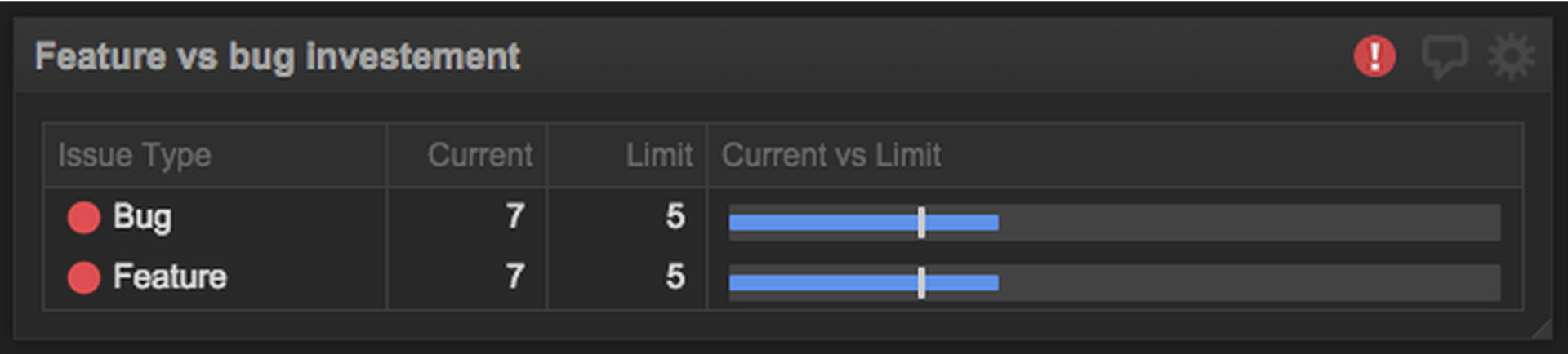
What it measures
This metric compares the effort (hours, story points, or percentage of capacity) your team invests in new features versus bug fixes and maintenance. It reveals whether your team is balanced or skewed too far in one direction.
Why it matters
Healthy development requires balance. Too much feature work and your technical debt grows, stability suffers, and customers become frustrated by bugs. Too much maintenance and you stall innovation, frustrating leadership and users waiting for new capabilities. The right ratio depends on your business stage and strategy.
When to act
If the ratio drifts outside your target range, adjust priorities in your next planning cycle. Work with Product Management to reset expectations if incoming defects are higher than anticipated.
Data source
Issue tracking tools like Jira, YouTrack, or Azure DevOps.
Code review backlog

What it measures
This metric tracks the number of pull requests or merge requests awaiting code review and the number waiting to be deployed. It highlights work that is functionally complete but not yet in the hands of customers.
Why it matters
Code reviews are a quality gate and a knowledge-sharing tool. When reviews pile up, work stalls and reviewers become a bottleneck. A large number of items waiting to deploy suggests deployment processes are slow or infrequent, delaying value delivery.
When to act
When the code review backlog grows, developers prioritize reviews over starting new work. This keeps the pipeline flowing and ensures quality standards are maintained without becoming a blocker.
Data source
Version control platforms like GitHub, GitLab, or Bitbucket.
Project burndown
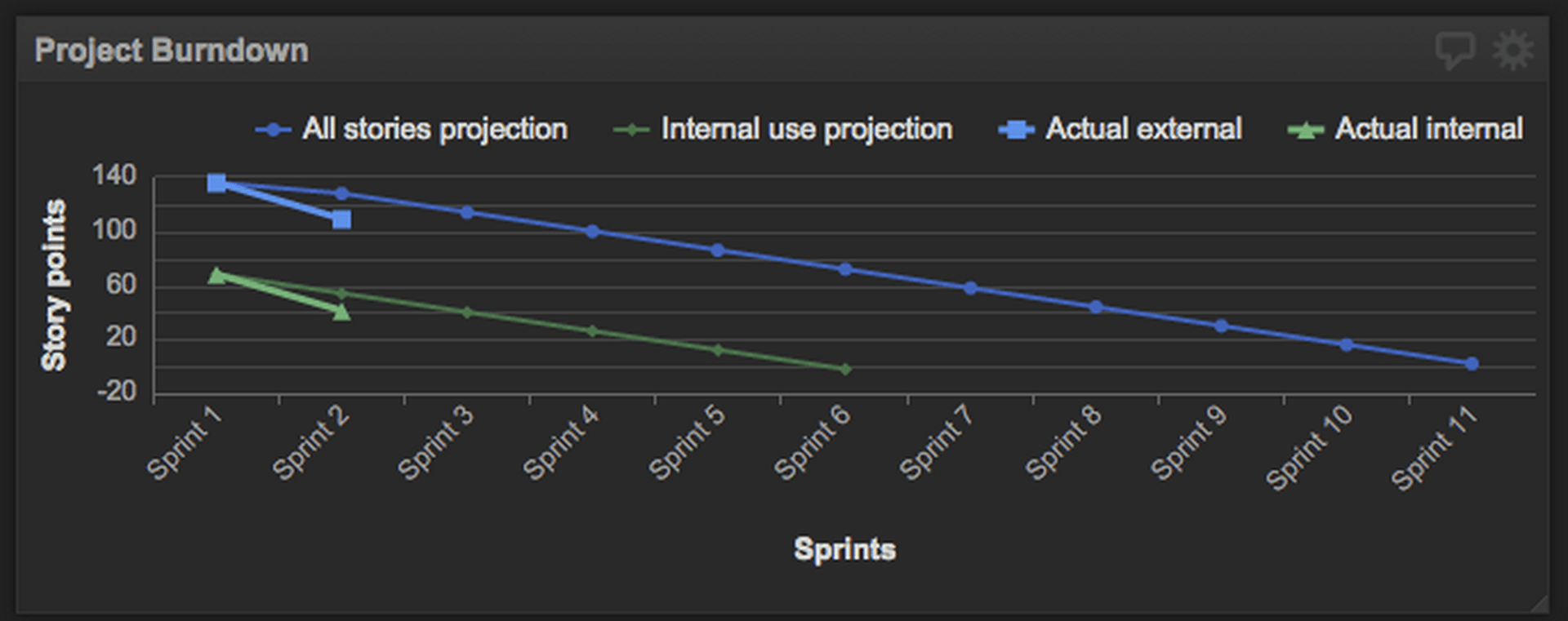
What it measures
A burndown chart plots remaining work (typically in story points or hours) against time, showing both your initial projection and actual progress. It's commonly used to track sprints, releases, or longer-term roadmap initiatives.
Why it matters
Burndown charts reveal whether your team is on pace to deliver. If actual progress consistently lags the projection, you have a signal that estimates were optimistic, scope crept, or the team encountered unexpected challenges.
When to act
Monitor the trend. If you're consistently below the projected line, conduct a root cause analysis: Are estimates too aggressive? Is the team blocked? Do you need more resources? Adjust timelines or scope accordingly, and communicate early with stakeholders.
Data source
Project management tools like Jira, Azure DevOps, or spreadsheets (Google Sheets, Excel).
Release pipeline kanban
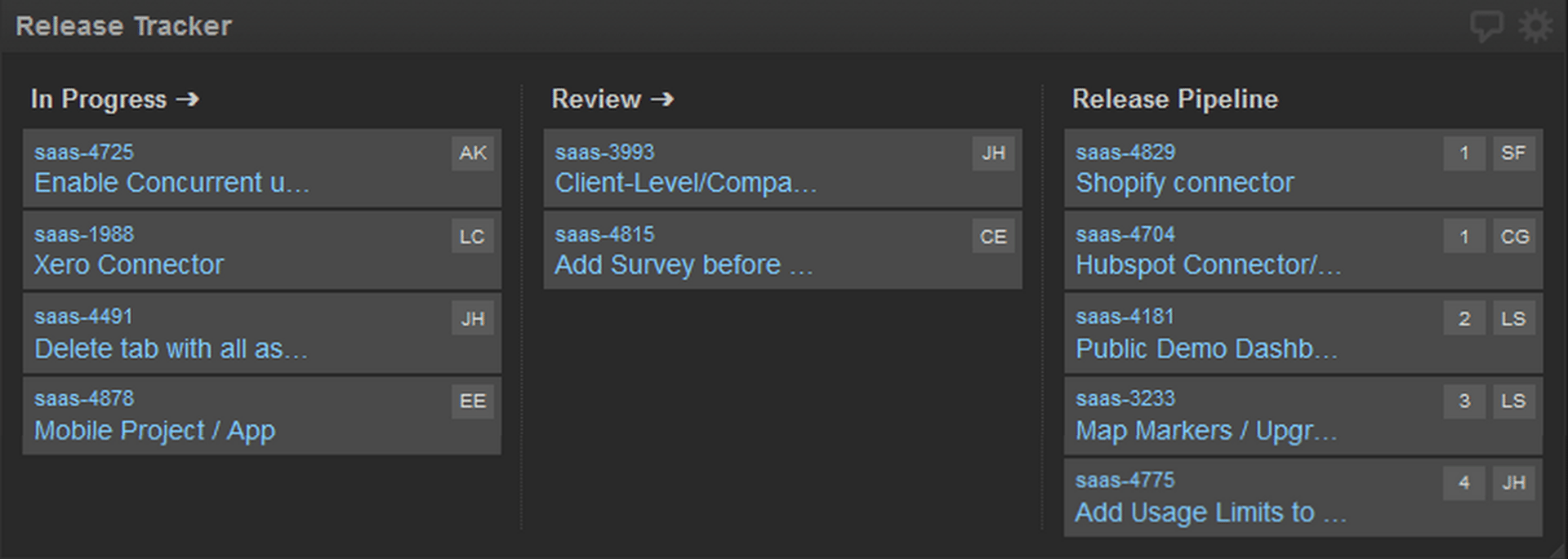
What it measures
A visual Kanban board showing work items as they move through stages: Backlog - In Development - Code Review - Testing - Ready to Release - Deployed. This is a snapshot of what's in flight and where each item stands.
Why it matters
The Kanban board is a communication tool as much as a metric. It gives everyone on the team visibility into what's happening, reduces status-update meetings, and makes bottlenecks obvious. When the board is projected on a team screen or shared during standups, it becomes the single source of truth.
When to act
Use this metric for awareness and team alignment rather than as a trigger for action. However, if items are stalled in any stage, it's a signal to investigate and unblock.
Data source
Project management tools like Jira, Azure DevOps, or spreadsheets (Google Sheets, Excel).
Putting it all together
The metrics above work best when displayed on a single, centralized dashboard that your team can reference daily. Project it on a screen visible to the entire team, use it in your standup meetings, and make it the default reference for status discussions. This eliminates the need to switch between multiple tools or rely on email updates.
When you centralize your metrics, several things happen naturally:
- Alignment improves. Everyone sees the same data and understands priorities the same way.
- Decisions become faster. When a metric goes red, the team knows what to do without waiting for a meeting.
- Accountability increases. Transparent metrics create shared ownership of outcomes.
- Continuous improvement accelerates. Trends become visible, and root causes surface quickly.
Beyond the basics: Metrics to consider
The six metrics above cover work-item visibility and pipeline health. As your team matures, consider adding metrics that track code quality, infrastructure health, and deployment frequency:
- Continuous integration health: Build pass/fail rates and failure trends over time.
- Test coverage: Automated and unit test coverage percentages, tracked over sprints or releases.
- Deployment frequency and incidents: How often you deploy to production and how many incidents each deployment triggers.
- Static analysis findings: Issues flagged by code analysis tools, tracked to spot quality trends.
- Technical debt: Count of work items tagged as technical debt, monitored to prevent accumulation.
These metrics require more sophisticated data sources and setup, but they provide deeper insight into long-term sustainability and code health.
Getting started
Start with the six core metrics above. Choose a dashboard tool that connects to your existing data sources—issue tracker, version control, and project management platform. Set reasonable thresholds based on your team's capacity and business priorities. Project the dashboard where your team works, and reference it every day.
The goal is not to create a surveillance tool but to build shared visibility. When your team can see the same metrics at the same time, alignment happens, decisions become faster, and outcomes improve. Metrics work best when they're transparent, actionable, and part of your daily rhythm.
Related Articles

5 tips to understand (and organize) your restaurant data
By Saleem Khatri — June 9th, 2026
10 Cloud BI Dashboard Tools for Small Businesses in 2026
6 dashboards I use daily to run my SaaS company
By Allan Wille, Co-Founder — April 10th, 2026