

The beginner's guide to e-commerce KPIs
Commerce has shifted online for good. Amazon sets the pace. Shopify stores pop up daily. Meal kits, subscriptions, and direct-to-consumer brands crowd your feeds. If you run an online store, clear KPIs help you focus and grow.

Buying goods online is the norm, not the exception. If you run an online store, the right KPIs tell you what's working, what isn't, and what to do next.
This guide walks through how to develop key performance indicators for your online store and track them with reporting software like Klipfolio Klips.

Why you need KPIs for e-commerce
KPIs act like guideposts for your business. They set a destination and show progress along the way. Without them, you're left pasting numbers into a spreadsheet and guessing what they mean.
KPIs in business:
Help establish the underlying strategic goals of your business
Set targets you can work to achieve
Act as a litmus test for how well you're reaching those goals
The goal isn't to produce reports. It's to know, at any moment, whether your store is on track.
Why e-commerce KPIs are different
Picture a brick-and-mortar shop that tracks every visit and interaction. You'd know how many people walked in, which items they picked up, how close they got to checkout, and which campaign brought them in. That's the level of detail e-commerce gives you.
Running an online store produces data that traditional retailers could only dream about. It makes sense to define a distinct set of KPIs to measure success, and to surface that data in a way that doesn't require you to go digging every time you need an answer.

How to set your e-commerce KPIs
Every KPI should match the business it measures. Copying a generic list rarely works. Build your own.
There are a few factors to consider when setting your e-commerce KPIs.
Consider your underlying strategic goals
E-commerce KPIs should reflect why your store exists.
Maybe you run a small basket shop because you love handweaving and want to share your craft. Extra income is nice, but it's not the main goal. In that case, customer satisfaction might be a better KPI than profit.
Or you're a non-profit selling bracelets to raise awareness. Profit isn't the goal. Total bracelets sold fits better.
A multinational retailer will likely include profit as a core KPI. Different goals, different KPIs.
Cut out the noise
KPIs are not a catch-all for every metric or department initiative. They highlight what drives business success.
Social media followers can be useful. More followers might mean more traffic. In most cases, though, follower count isn't a fundamental measure of success for an online store. It's a vanity metric.
Focus your e-commerce KPIs on metrics that reflect the health of your store. Treat the rest as background noise.
Consider your benchmarks
No one wants to chase impossible targets. Look at previous results to find realistic improvements and set targets accordingly. It's a core step in setting actionable KPI targets.
The different ways of looking at e-commerce performance
Deciding which KPIs to track? Group e-commerce performance into a few categories: marketing metrics, sales metrics, user experience metrics, and customer satisfaction metrics.
Your KPIs will vary by store. Using these categories helps you narrow the list and focus on what actually moves the needle.
Marketing metrics
Marketing metrics show how well you attract people to your store and whether they convert once they arrive.
For example, say your audience spends time on X. You set a goal to drive traffic from X to your site and track the number of clickthroughs from that channel.
Other examples include:
Conversions attributed to paid advertising campaigns
Return on investment from paid advertising campaigns
Followers on social media accounts
Impressions on social media accounts
Views of blog posts created as part of a content strategy
Conversion rate per medium
Create custom dashboards for you and your team.
Get started with KlipsSales metrics
Sales metrics show how effectively you turn visits into revenue. They also surface which products perform well and where revenue drags.
Notice a high abandoned cart rate? Shipping costs might be the issue. People add products to a cart, reach the checkout, then see shipping fees and leave. Try free shipping or adjust the offer and test the impact. That's the kind of clear signal that tells you exactly what to fix.
Other examples of sales metrics include:
Number of transactions
Revenue per transaction
Abandoned cart rate
Revenue per product
User experience metrics
Would you buy from a store that's tough to navigate? Probably not. The same applies online.
If your site is clunky or slow, you'll lose sales before you ever know a customer was there. User experience metrics help ensure customers can find what they need, complete checkout, and use any device or browser without friction.
Check your Google Analytics 4 data. If the abandoned cart rate is much higher on mobile than desktop or tablet, you may have a mobile performance issue. Run tests and fix what's blocking conversions. A small UX fix can recover revenue you didn't know you were losing.
Other examples include:
Site speed on different mobile devices
Bounce rate by device and browser
Conversion rate by device and browser
Cart abandonment rate by device and browser
Customer satisfaction metrics
The job isn't done at the thank you page. Measure how happy customers were before, during, and after the purchase.
This includes what people say about your brand online. It can also reveal blind spots in your quality control process.
If you use a drop-shipper, you don't control packaging and shipping end to end. A spike in negative reviews about damaged goods is a signal to address fulfilment with your partner. Without tracking this, that problem can quietly erode trust for months.
Examples include:
Customer satisfaction survey results
Online review site results
On-site and product reviews
Social media comments
Common e-commerce KPIs
Your KPIs should be unique to your store, but examples help you get started. Here are common e-commerce KPIs to consider.
Conversion rate
How it's calculated: Divide the number of sales by the number of users who visit your store.
Why it matters: Conversion rate shows how well you turn visits into purchases. A high rate points to a smooth experience, appealing products, and a simple checkout. A low rate signals usability issues to fix, and gives you a clear place to start.
Number of website visits
How it's calculated: Use an analytics tool to count how many users your site attracts.
Why it matters: You can't make sales without traffic. This is especially important when your site is new and you're building visibility. Watching this number grow tells you your awareness efforts are working.
Revenue
How it's calculated: Sum the money earned from purchases on your site.
Why it matters: For most e-commerce stores, revenue sits at the core of success. Even if profit isn't the main goal, revenue shows how often your product reaches customers.
Average order value
How Average Order Value is calculated: Divide total revenue for a period by the number of sales in that period.
Why it matters: Upselling matters in e-commerce. Amazon's bundles and "people also bought" suggestions are classic examples. The more items per order, the more revenue per transaction. A rising average order value means your merchandising is working.
Cart abandonment rate
How it's calculated: Divide the number of users who add products to a cart by the number of completed purchases.
Why it matters: Getting customers to finish the purchase is critical. A high cart abandonment rate points to friction or disincentives. Shipping costs, unexpected fees, or checkout problems on specific devices and browsers are common culprits. Knowing the rate tells you there's a problem; digging into where it spikes tells you what to fix.

Create custom dashboards for you and your team.
Get started with KlipsBringing it all together
E-commerce needs its own set of KPIs. Even traditional retailers with an online arm should track separate metrics for the store.
The principle stays the same: measure what proves success, track it consistently, and keep your numbers in one place so you're not waiting for someone to pull a report or figuring it out from scratch every time. Start with a shortlist of KPIs, then expand as your store evolves.
Get more inspiration in the KPI Examples Library.
Updated 2026-09-08
More in KPI

5 KPIs to track your e-commerce store success

How your online advertising and eCommerce site are driving sales
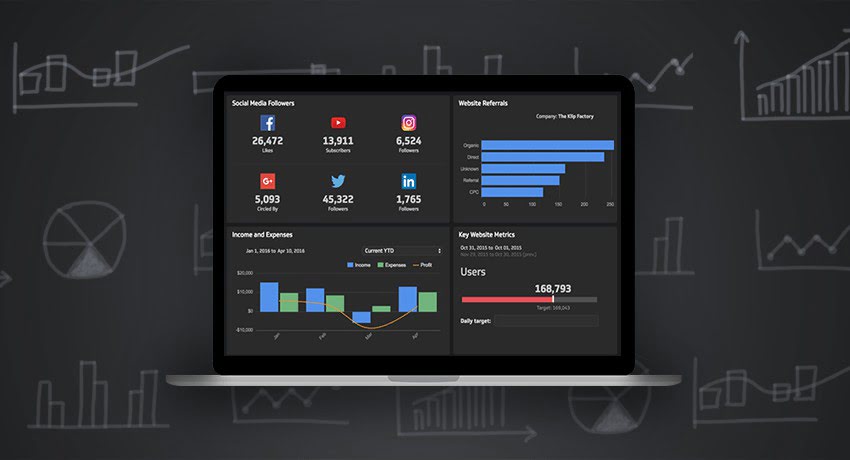
What is a KPI, metric, or measure?

Electrolux tracks sales metrics and KPIs for European offices with Klipfolio

Mobile website performance: the essential KPIs

Top metrics to monitor for digital ad campaigns
Most recent
- SEP 25What SOC 2 taught a small team about trust
- SEP 15The AI race: progress, humanity, and trust
- SEP 9The good advisor
- AUG 11Beyond simple sign-ups: how True Trials and Activation predict growth
- JUL 7Why business leaders miss important trends in their dashboards
- JUN 19The best chart for the job: Visualizing data for non-technical users