Cost per Contact Metric
Measures how much each contact costs your call center and is a key part of any cost-benefit analyses you may run.
Track all your Call Center KPIs in one place
Sign up for free and start making decisions for your business with confidence.
What is Cost per Contact?
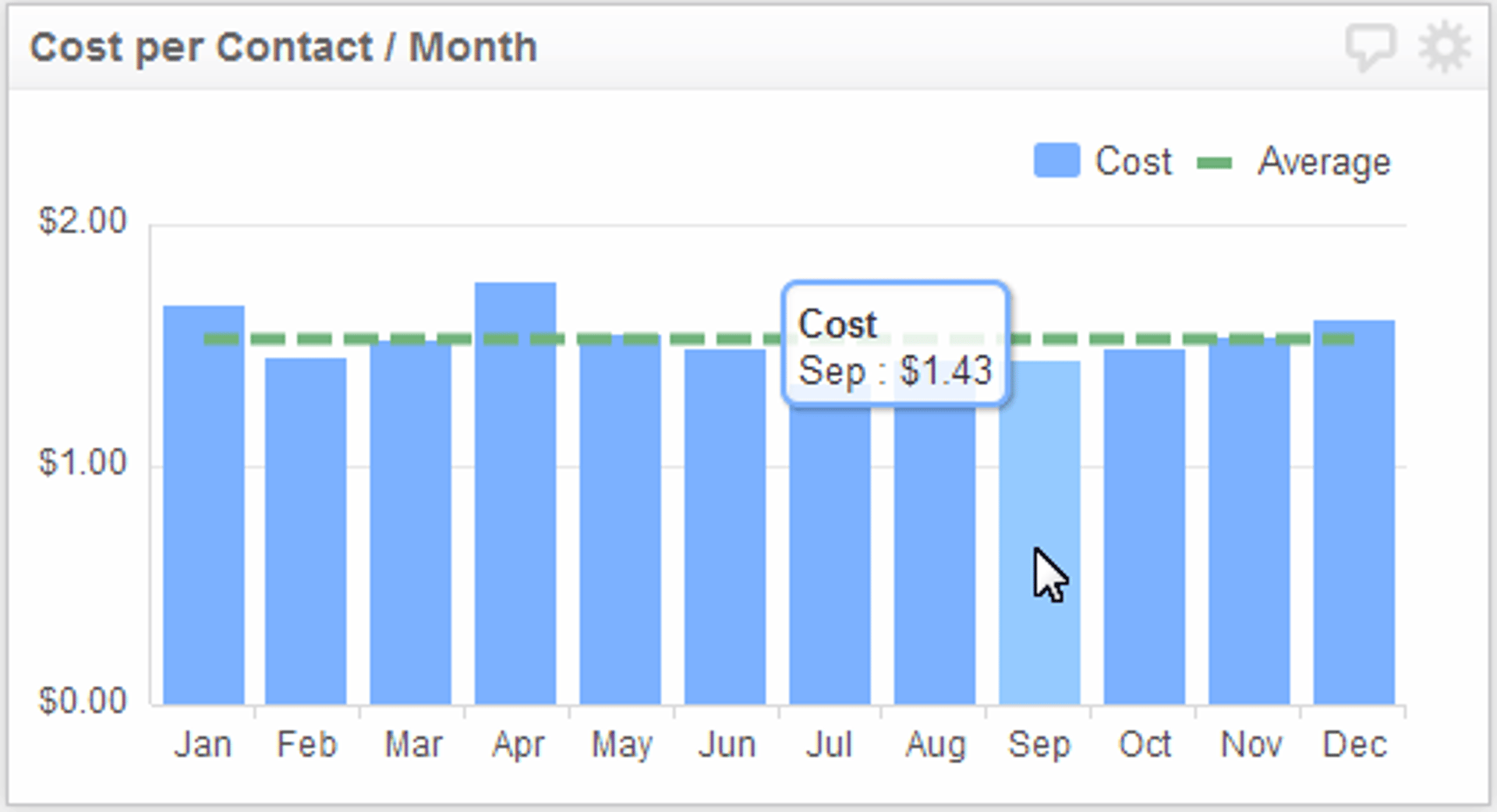
Cost per Contact measures the average cost required to handle a single customer interaction in your call center or contact center. It captures all controllable operating costs for a period and divides them by the total number of contacts handled over the same period. You can calculate it at the center level or by channel—for example, phone, chat, email, or messaging. A clear Cost per Contact (CPC) view helps you balance service quality with efficiency and make informed decisions about resource allocation and process improvements.
How to calculate Cost per Contact
Formula
Cost per Contact = Total operating costs for the period / Total contacts handled in the period
Define both parts before you report:
- Total operating costs: Include frontline labour (wages, benefits), overtime, contractor costs, telephony and software licences, quality and training time, management overhead, and facility costs. Exclude one-time projects and unusual items so the trend stays clean.
- Total contacts handled: Count completed customer interactions during the same period. Use the platform of record for each channel and avoid double-counting transfers. Decide whether to include internal calls.
Many teams also create channel-specific versions:
- Phone CPC: Phone-related costs / Phone calls handled.
- Chat CPC: Chat-related costs / Chats handled.
- Email CPC: Email-related costs / Emails resolved.
Channel CPCs reveal where process changes or technology investments lower cost without hurting experience.
Example
Last month, your operating costs were $540,000. Your center handled 120,000 contacts across all channels.
- CPC (overall): $540,000 / 120,000 = $4.50
You also tracked channel costs and volumes:
- Phone: $360,000 cost, 60,000 calls handled — $6.00 per call
- Chat: $120,000 cost, 45,000 chats handled — $2.67 per chat
- Email: $60,000 cost, 15,000 emails resolved — $4.00 per email
The split suggests that shifting simple inquiries to chat lowers aggregate cost, as long as First Call Resolution stays healthy.
What is a good benchmark?
Benchmarks depend on industry, geography, wage rates, contact mix, and complexity. Treat outside numbers as directional. Build internal targets that reflect your channels and case mix:
- By channel: Phone typically costs more than chat or messaging. Email sits in the middle. Self-service sits below all live channels.
- By complexity: Technical troubleshooting, regulated environments, and long investigations push CPC higher.
- By scale: Larger centers often achieve lower CPC through economies of scale and higher concurrency in digital channels.
Start with a rolling 6- to 12-month average by channel. Track the trend and the drivers rather than chasing a single number. A small CPC increase paired with higher First Call Resolution and rising Customer Satisfaction can still be a win.
Why Cost per Contact matters
Cost per Contact is essential for balancing operational efficiency with service quality. Understanding and tracking this metric helps you make strategic decisions about resource allocation, technology investments, and process improvements.
- Budget clarity: CPC links operating spend to volume so finance and operations speak the same language.
- Capacity planning: With a reliable CPC, you can model the cost impact of forecast changes and new programs.
- Channel strategy: CPC by channel informs deflection, self-service, and digital adoption plans.
- Process quality: Rising CPC often points to rework, long handle time, repeat contacts, or knowledge gaps.
- Vendor decisions: CPC gives a fair basis to compare internal performance with BPO partners.
- Performance benchmarking: Track CPC alongside Customer Satisfaction and Average Handle Time to ensure cost reductions don't come at the expense of service quality.
How to improve your Cost per Contact
Focus on reducing avoidable effort while protecting experience. These moves help:
- Eliminate repeat contacts: Strengthen Call Resolution, tighten follow-ups, and fix handoffs that cause callbacks.
- Shorten handle time with quality: Standardise greetings and verification, simplify screens, and keep knowledge articles short, current, and searchable.
- Shift simple contacts to low-cost channels: Promote chat for status checks and quick answers. Use proactive messaging to deflect known spikes.
- Increase schedule adherence: Small gains in adherence reduce queue time and shrink overtime spend. Track Agent Schedule Adherence to identify improvement opportunities.
- Right-size staffing to the interval: Staff the peaks, not the average. Add micro-shifts for predictable surges.
- Fix the top contact reasons: Partner with product and operations to remove the root causes that generate your highest-volume, low-value contacts.
- Tune tool licences: Align seat counts, turn off unused add-ons, and consolidate platforms where it makes sense.
Guardrails matter. Cutting cost by rushing calls or bouncing customers between queues increases repeat volume and hurts customer satisfaction, which raises CPC over time.
How to monitor Cost per Contact in Klips
Klips lets you bring cost and volume data together in one dashboard so everyone sees the same CPC. A simple build looks like this:
- Connect sources: Import cost data from your finance system and volumes from telephony, chat, and ticketing tools. Use a shared calendar for periods.
- Model measures: Create Total Operating Cost, Contacts Handled, and CPC. Add channel-level versions and flags for unusual items.
- Visualise clearly: Use a single value for current CPC, a 13-month line for trend, and a stacked bar for CPC by channel. Add a table of top contact reasons with Average Handle Time and repeat rate.
- Segment for action: Filter by queue, product, and region. Track initiatives—for example, a new knowledge base or IVR change—with annotations.
- Distribute with control: Schedule monthly PDFs for finance, keep a wallboard view for the floor, and share secure links with leadership.
Pair CPC with Average Handle Time, Call Abandonment, and Service Level to keep speed, access, and cost in balance.
Reporting frequency
Report CPC monthly for finance and quarterly for strategy. Keep a weekly channel view during major launches, marketing campaigns, or seasonality peaks so you can react fast.
Similar KPIs
Related Metrics & KPIs