

The 25 must-have KPIs for call centre managers
Call centre managers have waves of data coming at them from various platforms and business processes. This article covers the 25 must-have call centre KPIs, from First Contact Resolution and Average Handle Time to Agent Utilization and Cost per Call, with definitions, examples, and tips for tracking them in real time.

Call centres generate waves of data every hour. Without a clear way to read that data, it's easy to spend the day reacting instead of leading.
The right KPIs change that. They tell you what's happening, why it matters, and what to do next, without waiting for someone to pull a report or paste numbers into a spreadsheet.
This list covers the 25 call centre KPIs every manager needs to stay ahead of the team, the queue, and the numbers.
What are call centre KPIs?
A KPI (Key Performance Indicator) is a measurable value that shows how effectively a team or operation is hitting its goals. For call centre managers, the right KPIs surface problems before they escalate and confirm what's working before you change it.
Think of them like a life jacket: they keep you afloat, but you still need to act on what they show you.
Want to go deeper? Start with What is a KPI.
Quick tips for call centre KPI programs in 2026
Before diving into the list, a few principles that separate high-performing call centre teams from reactive ones:
- Prioritize First Contact Resolution: Pair it with quality reviews and clear knowledge articles so agents resolve issues the first time.
- Tune channel SLAs: Set response and resolution targets by channel. One-size-fits-all thresholds miss the nuance.
- Watch occupancy and wellbeing together: High utilization is only good up to a point. Track it alongside turnover signals to catch burnout early.
- Close the loop on repeat contacts: Tag root causes on recurring calls and fix the upstream issue, not just the symptom.
- Make KPIs visible: Share live dashboards on TV screens, mobile, and email so every agent and stakeholder stays aligned without having to ask.
The top 25 call centre KPIs
These are the must-have metrics for call centre managers running busy teams.
1. Sales per Agent
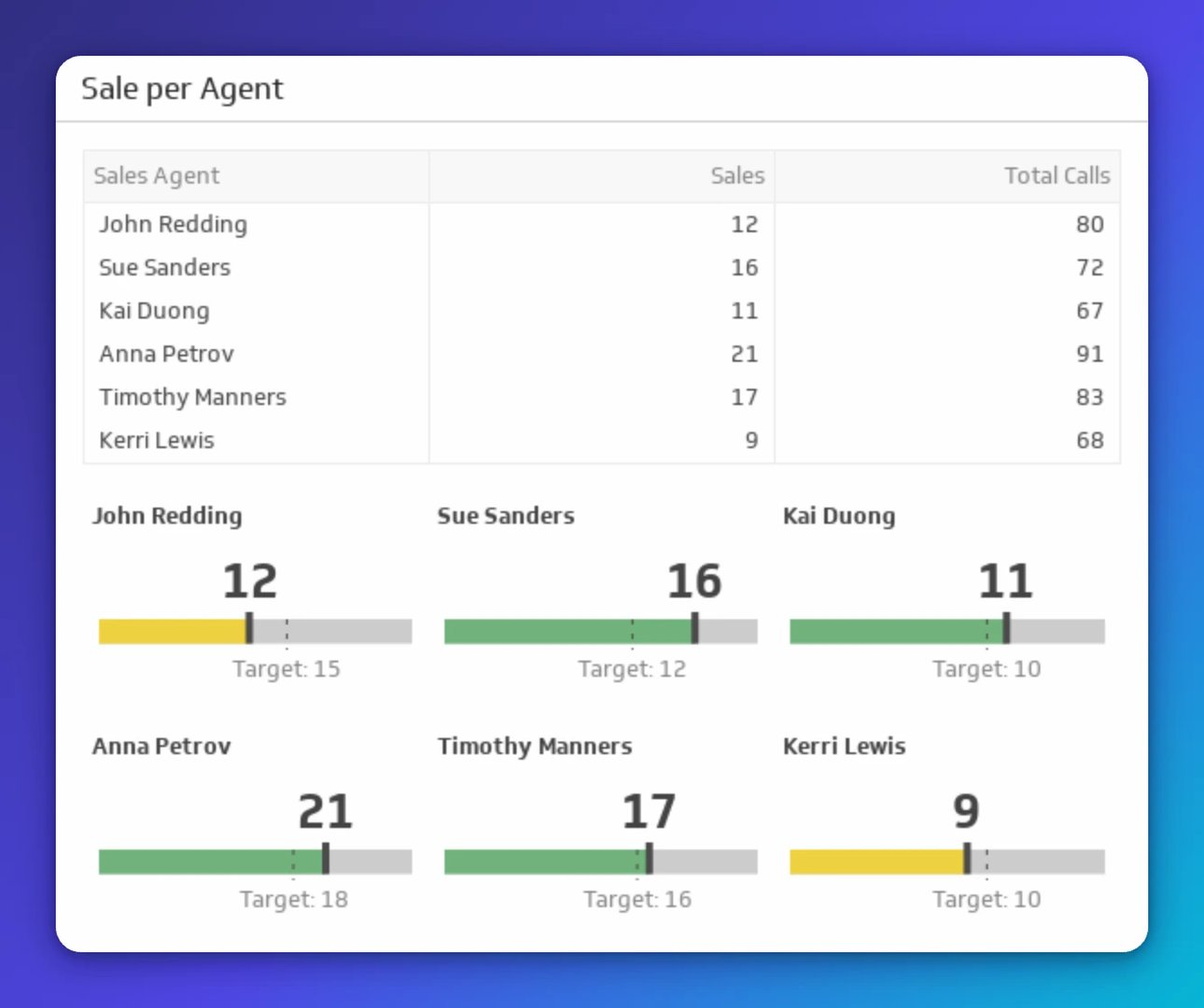
Tracks individual sales output against total calls handled. Use it to set fair targets, spot coaching opportunities, and keep performance consistent across the team.
2. Active Waiting Calls
!Active Waiting Calls
Shows how many callers are queued at any moment. Agents use it to pace their work; managers use it to make real-time staffing calls before the queue gets out of hand.
3. Longest Call Hold
!Longest Call Hold
Highlights the worst wait time in the queue against your target. A single outlier here can damage loyalty. Use it to adjust routing or pull in additional capacity before a caller gives up.
4. Peak Hour Traffic
!Peak Hour Traffic
Identifies your busiest hour so schedules match actual demand. Knowing your peak means you're never caught understaffed when it matters most.
5. Revenue per Successful Call
!Revenue per Successful Call
Shows the revenue generated per completed sale. Use it to set realistic targets and understand the financial weight of every effective conversation.
6. Call Center Status Metrics
!Call Center Status Metrics
Rolls up multiple metrics into a single performance snapshot. Useful when you need a fast read on overall health without digging into individual reports.
7. Call Abandonment
!Call Abandonment
Tracks callers who disconnect before reaching an agent. Read it alongside Active Waiting Calls and On-Hold Time to understand whether abandonment is a queue problem, a staffing problem, or both.
8. Telecom Subscriber Acquisition Cost
!Telecom Subscriber Acquisition Cost
Quantifies total spend per new subscriber, including agent time, advertising, and overhead. Keeps acquisition investment honest and comparable across channels.
9. Average Handle Time
!Average Handle Time
Measures average call duration from start to finish. Use it to understand workload distribution and coach agents on clarity and resolution, not just speed.
10. Cost per Call
!Cost per Call
Captures the full cost of each call: staffing, demand generation, equipment, and overhead. The number you need when making the case for efficiency investments.
11. Customer Satisfaction
!Customer Satisfaction
Reflects how customers rate their interactions. Tie it directly to coaching sessions and QA reviews so the score drives action, not just reporting.
Create custom dashboards for you and your team.
Get started with Klips12. After Call Work Time
!After Call Work Time
Measures the time agents spend on post-call tasks before they're available again. High After Call Work Time often signals admin friction that can be reduced with better tools or templates.
13. Cost per Contact
!Cost per Contact
Shows the cost of each individual contact across channels. Use it to compare channel efficiency and make smarter budget decisions.
14. On-Hold Time
!On-Hold Time
Tracks how long callers wait on hold before connecting to an agent. Even a small reduction here has a measurable impact on Customer Satisfaction scores.
15. Customer Calls Answered in the First Minute
!Customer Calls Answered in the First Minute
Monitors speed to answer. Align staffing levels and IVR configuration to this number to reduce early abandonment and protect the caller's first impression.
16. Call Arrival Rate
!Call Arrival Rate
Tracks incoming call volume over time. Spot trends, anticipate peaks, and build forecasting models that keep staffing one step ahead of demand.
17. Call Resolution
!Call Resolution
Shows resolution rates, including First Contact Resolution and repeat contacts. A rising repeat contact rate is a signal to investigate root causes, not just coach agents harder.
18. Average Sales per Agent
!Average Sales per Agent
Tracks mean sales output across the team. Use it alongside Sales per Agent to identify outliers and build coaching programs around what your top performers actually do.
19. Call Setup Success Rate (CSSR)
!Call Setup Success Rate (CSSR)
Shows the rate of successful call connections. Use it for capacity planning and to hold vendors accountable to SLA commitments.
20. Time Lost Due to Technology Issues
!Time Lost Due to Technology Issues
Captures total downtime caused by technology failures. Tracking this makes the cost of unreliable systems visible, which is often the nudge needed to fix them.
21. Call Arrival Rate (rolling trend)
!Call Arrival Rate
A focused trend view of incoming volume over a rolling window. Use it to refine staffing models and catch seasonal patterns before they catch you.
22. Callback Messaging
!Callback Messaging
Counts messages requesting a callback. Use it to size follow-up workload and prevent callback backlogs from dragging down Customer Satisfaction.
23. Repeat Calls
!Repeat Calls
Surfaces recurring issues driving unnecessary contact volume. Prioritize fixes that remove the largest contact drivers, not just the most recent ones.
24. Agent Utilization
!Agent Utilization
Shows the share of time agents spend on calls or call-related work. High utilization looks good on paper until turnover climbs. Track it alongside wellbeing signals to protect the team.
25. Call Completion Rate
!Call Completion Rate
Compares successful connections to failed attempts. A low rate points to systemic issues worth investigating before they compound into larger service gaps.
See these KPIs live
Explore the full library on KPI Examples.
Track these KPIs in real time with Klips dashboards. Share them on TV screens, mobile, and scheduled email snapshots so your team and stakeholders always know the number, without anyone having to ask.
Updated 2026-08-28






Most recent
- SEP 25What SOC 2 taught a small team about trust
- SEP 15The AI race: progress, humanity, and trust
- SEP 9The good advisor
- AUG 11Beyond simple sign-ups: how True Trials and Activation predict growth
- JUL 7Why business leaders miss important trends in their dashboards
- JUN 19The best chart for the job: Visualizing data for non-technical users